How to Check SASSA Status on Moya App Step by Step
Checking your SRD R370 grant status no longer requires data or airtime. With the Moya App, South Africans can check their SASSA status completely free on MTN, Vodacom, Telkom, Cell C, and other supported networks. Even if your balance is R0, the app still works through zero-rated access.
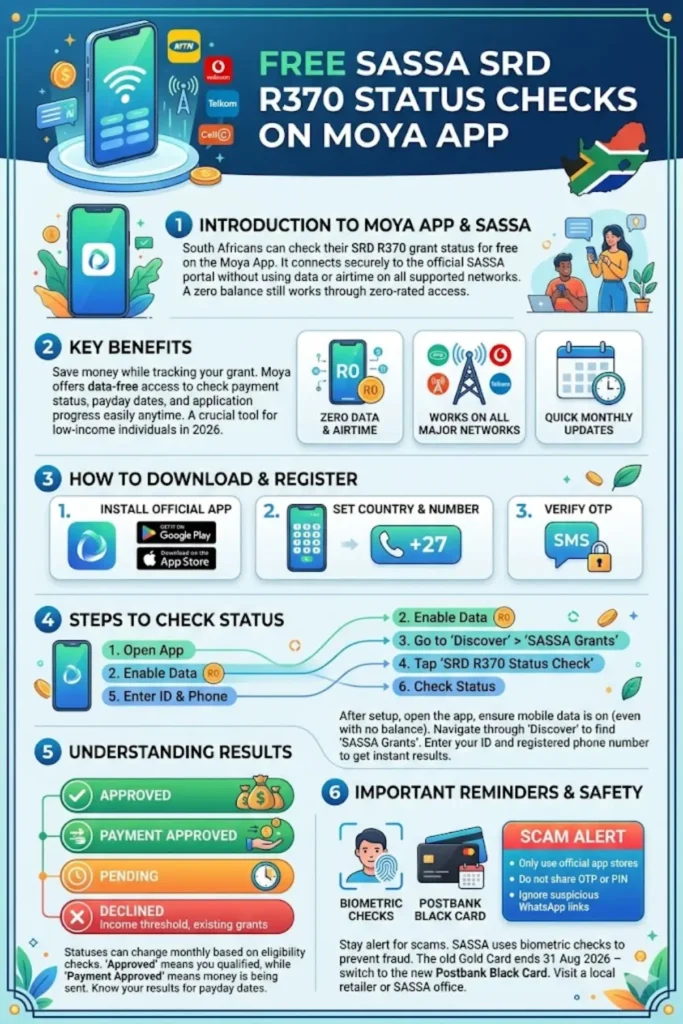
The app has become one of the easiest ways to track SRD R370 payments, approval status, payday dates, and application progress in 2026. It connects users directly to the official SASSA SRD Portal without charging mobile data costs.
What Is the Moya App?
The Moya App is a South African mobile application that offers data-free access to selected online services. One of its most popular features is free access to SASSA SRD status checks.
When you open the SASSA section inside the app, it securely loads the official government SRD website. Your information goes directly to the SASSA system, while Moya only provides the free internet connection.
You can also read: How to Check South African Fuel Station Crisis
Why Millions Use the Moya App for SASSA
Many SRD beneficiaries rely on the app because monthly data costs can become expensive. Since the SRD grant is designed for low-income individuals, checking payment status without spending money makes a big difference.
Key benefits include:
- No airtime required
- No mobile data needed
- Works with R0 balance
- Available on MTN, Vodacom, Telkom, and Cell C
- Quick access to SRD payment updates
- Free status checks anytime
Is the Moya App Official and Safe?
The Moya App is not an official government application. It was not developed by South African Social Security Agency. However, it is generally considered safe for checking SRD grant status because it redirects users to the official SASSA portal.
For security reasons, sensitive changes such as banking updates should only be done on the official SASSA SRD Website. Avoid entering personal information into unofficial websites or APK downloads shared on WhatsApp.
Official Stores to Download Moya App
| Device | Official Store |
|---|---|
| Android | Google Play Store |
| iPhone | Apple App Store |
| Huawei | AppGallery |
Never install the app from unknown websites or SMS links because fake apps can steal your personal information.
How to Download and Register on the Moya App
Downloading the app takes only a few minutes. You may need Wi-Fi or mobile data for the initial installation, but after setup, SASSA services inside the app become data-free.
Step 1: Install the App
Search for “Moya App” in your phone’s app store and install the official version published by Moya App (Pty) Ltd. Open the app and accept the permissions and terms.
Step 2: Set Your Country and Phone Number
Choose South Africa as your country and enter your active mobile number with the +27 code. Use the same number linked to your SASSA application.
Step 3: Verify OTP
You will receive a 6-digit OTP code through SMS. Enter the code to complete registration. Once verified, your account becomes active.
How to Check SASSA Status on Moya App Step by Step
Checking your SRD R370 status inside the app is simple and takes less than two minutes.
Step-by-Step Process
- Open the Moya App on your phone.
- Turn on mobile data even if your balance is zero.
- Tap the “Discover” tab at the bottom.
- Select “SASSA Grants.”
- Tap “SRD R370 Status Check.”
- Enter your South African ID number.
- Enter your registered mobile number.
- Tap “Check Status.”
Your SRD status result will appear instantly on the screen.
Best Time to Check Status
SASSA usually updates payment information near the end of each month. The best period to check is between the 20th and 31st.
During this period, users can see:
- Approval updates
- Payday dates
- Banking verification progress
- Appeal outcomes
- Payment processing details
You can also read: Attacks on Foreign Nationals
Understanding Your SRD Status Results
Each SRD application goes through monthly verification checks. Your status may change from month to month depending on your financial situation and verification results.
| Status Result | Meaning |
|---|---|
| Approved | You qualified for this month |
| Payment Approved | Your money is being processed |
| Pending | Verification still in progress |
| Declined | You did not qualify |
| Referred | Manual review required |
| Identity Verification Failed | ID details do not match Home Affairs |
| Bank Details Pending | Banking information missing |
Approved vs Payment Approved
Many beneficiaries confuse these two statuses. Approved means you passed eligibility checks. Payment Approved means SASSA has started sending your money.
If you only see “Approved,” wait a few more days for the payday to appear before visiting an ATM or retailer.
Why Your SRD Application May Be Declined
South African Social Security Agency checks your information through several government systems every month. Even a once-off deposit above the income threshold can trigger a decline.
Common decline reasons include:
- Income above R625
- UIF registration
- NSFAS funding detected
- Incorrect personal details
- Existing government support
- Banking verification issues
If your application is declined unfairly, you can appeal through the official SRD Appeals Portal within 90 days.
How to Apply for SRD R370 Using the Moya App
You can also begin a new SRD application through the app. The application itself is processed on the official SASSA website loaded inside the app.
Information Required
Before applying, prepare the following:
- South African ID number
- Full legal name
- Active phone number
- Residential address
- Bank account in your own name
- Date of birth
Eligibility Requirements
To qualify for SRD R370 in 2026, applicants must:
- Be between 18 and 59 years old
- Be a South African citizen, refugee, or asylum seeker
- Have income below R625 monthly
- Not receive other qualifying government grants
SASSA SRD R370 Payment Dates 2026
SASSA payments are processed in batches, meaning each person receives a unique payday.
| Month | Payment Window | Start Checking |
|---|---|---|
| May 2026 | 25–30 May | 20 May |
| June 2026 | 24–30 June | 20 June |
| July 2026 | 24–30 July | 20 July |
| August 2026 | 24–30 August | 20 August |
| September 2026 | 24–30 September | 20 September |
Always wait for your payday to appear before attempting to withdraw funds.
Important SASSA Updates for 2026
South African Social Security Agency introduced biometric checks to reduce fraud. Some applicants may receive a secure verification link requesting a selfie comparison with Home Affairs records.
If you receive this request:
- Complete it immediately
- Use a stable internet connection
- Visit a SASSA office if needed
- Do not ignore the message
Failure to complete biometric verification may delay your payment.
You can also read: Nsfas Disbursement to Accommodation
Postbank Black Card Deadline
The old SASSA Gold Card will stop working after 31 August 2026. Beneficiaries should switch to the new Postbank Black Card before the deadline.
Cards can be collected from:
- Shoprite
- Checkers
- Boxer
- Usave
Common Moya App Problems and Fixes
Most issues are caused by outdated app versions, wrong phone numbers, or disabled mobile data.
| Problem | Solution |
|---|---|
| Blank screen | Clear app cache and restart |
| OTP not arriving | Check signal and resend SMS |
| Status not loading | Enable background activity |
| No results found | Use correct SASSA phone number |
| Data-free not working | Turn on mobile data |
| Old app version | Update to latest version |
Keeping the app updated helps prevent most technical problems.
Important Scam Warning
Scammers often create fake SASSA websites and fake Moya App downloads to steal grant money and personal details.
To stay safe:
- Only use official app stores
- Never share your OTP or PIN
- Ignore suspicious WhatsApp links
- Verify websites carefully
- Use only the official SASSA portal
The official SASSA WhatsApp number is 082 046 8553 with a verified badge.
Conclusion
Using the Moya App is one of the easiest ways to check your SRD R370 status for free in 2026. It saves money, works across major networks, and gives quick access to official SASSA updates without needing airtime or mobile data.
As SASSA continues improving digital verification and payment systems, staying informed through reliable platforms becomes even more important. Always use trusted sources, keep your information updated, and regularly check your SRD status to avoid missing important payment updates.
FAQs
Can I check my SASSA SRD R370 status on the Moya App without data?
Yes, the Moya App offers data-free access to selected services, allowing eligible users to access the SASSA SRD portal without using their mobile data balance on supported networks.
Is the Moya App an official SASSA application?
No. The Moya App is not developed by SASSA. However, it can provide access to the official SASSA SRD portal through its data-free platform.
What information do I need to check my SRD R370 status?
You generally need your South African ID number and the mobile phone number registered with your SASSA SRD application.
Why does my SRD status show “Approved” but no payment date?
“Approved” means you passed the eligibility checks for that month. Your payment date may appear later once SASSA has completed payment processing.
Is it safe to update my banking details through the Moya App?
For security, banking changes and other sensitive account updates should be completed directly through the official SASSA SRD website, not through unofficial links or downloads.