SASSA Identity Verification Fixed, eKYC Links, And Solutions to Upcoming Problems
SASSA identity verification is a critical step in ensuring that every applicant receives the correct grant without delays. Whether you are applying for the SRD R370 grant or using the Services Portal for other grants, even a small mismatch in your personal details can stop your application or cause monthly declines.
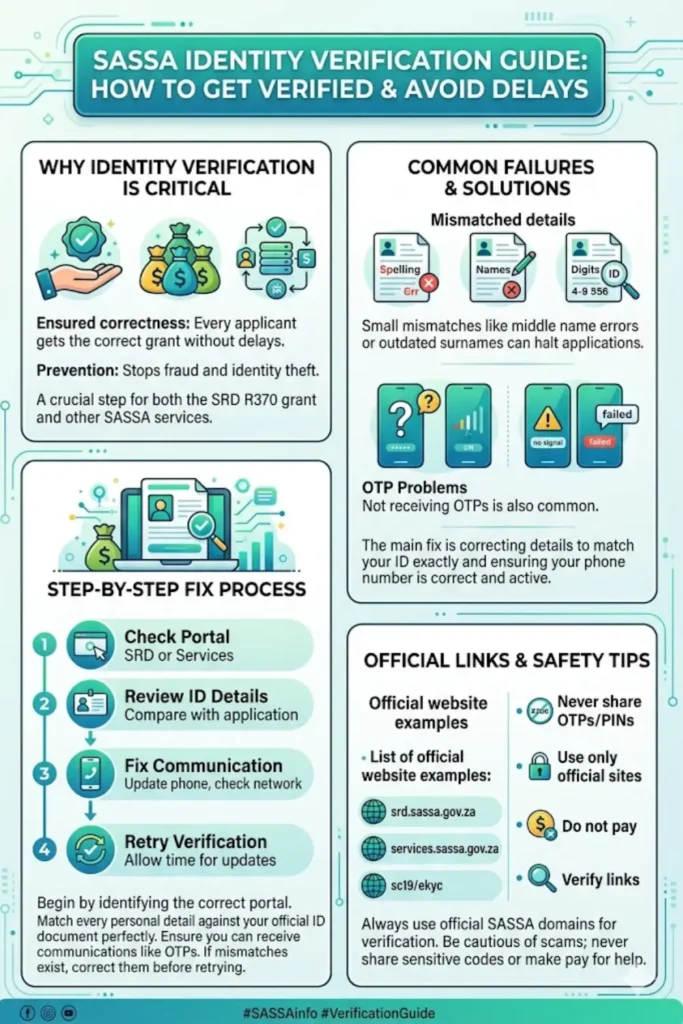
This guide explains everything in a clear and simple way—how identity verification works, where it fails, and how you can fix it quickly. It also includes official eKYC links, practical solutions, and tips to avoid common problems.
Understanding SASSA Identity Verification (SRD vs Other Grants)
Identity verification is the process used by SASSA to confirm that your personal details match official records. This step ensures that grants are given to the right person and prevents fraud.
For SRD (R370), identity verification is done monthly. If something goes wrong, your status may show “identity verification failed.” For other grants, issues usually appear as login failures, OTP problems, or delays in application processing.
The main difference lies in how the systems work:
- SRD Portal
- Monthly verification checks
- eKYC process with PIN or linked phone number
- Status updates per month
- Services Portal (Other Grants)
- Full application-based verification
- OTP login system
- Document uploads required
Fixing identity issues early helps prevent repeated rejections or delays in future applications.
Official SASSA eKYC Links and Access Points
Using the correct official links is essential to avoid scams and complete your verification securely. Always check that the website domain is genuine before entering any personal information.
Below is a quick reference table of official portals:
| Purpose | Official Link |
|---|---|
| SRD Status Check | srd.sassa.gov.za/sc19/status |
| eKYC Hub | srd.sassa.gov.za/sc19/ekyc |
| eKYC Status | srd.sassa.gov.za/sc19/ekyc/status |
| eKYC Reverification | srd.sassa.gov.za/sc19/ekyc/reverification |
| Services Portal | services.sassa.gov.za |
These portals are the only safe places to complete identity verification. Never trust links sent by unknown sources, even if they appear official.
OTP and SMS Issues: The Most Common Problem
One of the biggest reasons for identity verification failure is not receiving the OTP or PIN. Without this code, the system cannot confirm your identity.
This issue is usually related to your phone number or network rather than your ID details.
To fix OTP/SMS problems, follow these steps:
- Check your registered number
- Make sure it matches the number on your application
- If changed, update it before retrying
- Improve signal and delivery
- Restart your phone
- Turn airplane mode on and off
- Move to an area with better network coverage
- Check phone settings
- Ensure SMS is not blocked
- Clear inbox if full
- Allow messages from unknown senders
- Retry correctly
- Wait before requesting another OTP
- Avoid repeated quick attempts
If the problem continues, contact the SASSA call center and confirm your registered number and verification status.
You can also read: Change SRD Phone Number
Common Identity Mismatches That Cause Failure
SASSA uses exact-match verification. This means your details must match official records perfectly—no small differences are accepted.
Even minor errors can cause verification failure, such as:
- Name differences
- Missing middle names
- Incorrect spelling
- Wrong order of names
- Surname changes
- Marriage or divorce not updated
- Old surname still in system
- Incorrect ID details
- One wrong digit in ID number
- Incorrect date of birth
- System-related issues
- Duplicate records
- Delayed updates after corrections
These mismatches are common but fixable once identified correctly.
Step-by-Step Guide to Fix Identity Verification
Fixing identity verification does not require complicated steps. The key is to solve the root problem first.
Follow this practical process:
- Identify your system
- SRD portal or Services Portal
- Check your details
- Match your ID exactly
- Verify spelling, order, and numbers
- Fix communication issues
- Ensure OTP/PIN is received
- Update phone number if needed
- Correct mismatched information
- Update records through official channels
- Use correct documents if required
- Retry verification
- Allow time for updates
- Recheck status online
If you are still blocked, contact SASSA support and ask which specific detail is causing the failure.
What to Do If SRD Shows “Identity Verification Failed”
If your SRD status shows this message, it means the system could not confirm your identity for that specific month.
Do not rush to appeal immediately. First, fix the underlying issue.
Here’s the correct approach:
- Check your monthly status on the SRD portal
- Review your eKYC status if applicable
- Correct any mismatched details
- Ensure your phone number is active and correct
- Submit an appeal only after fixing the issue
Appealing without fixing the root cause usually leads to repeated rejection.
Documents Required for Other SASSA Grants
For grants on the Services Portal, identity verification often depends on submitting correct documents. These documents must be clear, valid, and sometimes certified.
Common required documents include:
- Proof of identity
- South African ID
- Temporary ID document
- Refugee permit (if applicable)
- Marital status proof
- Marriage certificate
- Divorce order
- Death certificate
- Financial documents
- Proof of income
- Bank statements
Make sure your uploads are:
- Clear and readable
- Not cropped or blurred
- Properly aligned
Incorrect or unclear documents can delay your application significantly.
Safety Tips to Avoid Scams and Errors
Identity verification involves sensitive personal information, so it is important to stay cautious.
Follow these safety tips:
- Never share OTPs or PINs with anyone
- Use only official SASSA websites
- Do not pay for verification services
- Avoid clicking unknown links
- Always verify before entering personal details
If something seems suspicious, stop immediately and contact official SASSA support.
Conclusion
SASSA identity verification problems are common, but most of them are easy to fix once you understand the cause. In most cases, the issue is either a mismatch in personal details or a problem receiving the OTP or PIN.
By following the correct steps checking your details, fixing communication issues, and using official portals you can resolve verification problems quickly and continue your application without delays.