How to Check SASSA e-KYC Status April 2026
The South African Social Security Agency (SASSA) has made e-KYC verification mandatory for all SRD R370 grant applicants and beneficiaries in 2026. This step was introduced to reduce fraud, improve transparency, and ensure that only eligible individuals receive financial support. If you have already completed your e-KYC verification, the next important step is to check your status regularly.
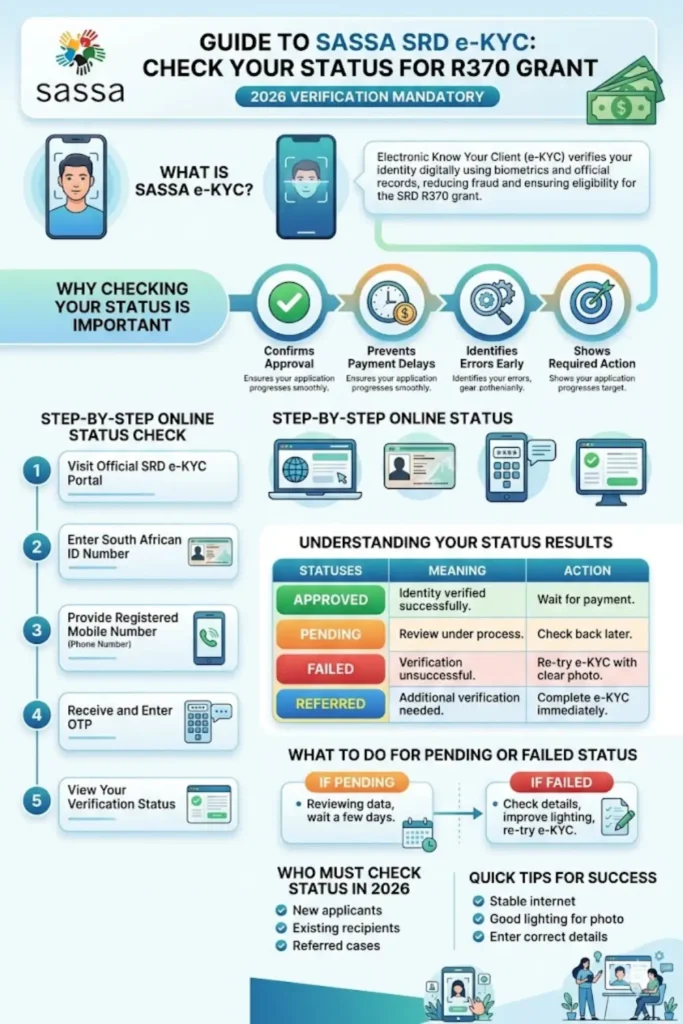
This guide explains everything in simple terms from what e-KYC means to how you can check your status online without confusion. The process is designed to be user-friendly, even for people with limited technical knowledge.
What is SASSA e-KYC Verification?
e-KYC (Electronic Know Your Client) is a digital identity verification process that confirms your identity using biometric data and official records. Instead of visiting offices with paperwork, you can now verify your identity using a smartphone or computer.
In the case of SASSA, this system uses facial recognition technology. It matches your live photo with the records stored in the Department of Home Affairs database. This helps prevent fraud cases, including fake identities and duplicate applications.
This verification is especially important because millions of fraudulent SRD grant cases have been reported in recent years. By introducing e-KYC, SASSA aims to protect public funds and ensure fair distribution.
You can also read: SASSA Appeals 2026 Check SRD
Why Checking Your e-KYC Status is Important
After completing your verification, checking your status ensures that your application is progressing correctly. Many applicants assume the process ends after submission, but that is not true.
Your e-KYC status determines whether you will receive your R370 grant payments. If your verification is pending or failed, your payments may be delayed or stopped.
Key reasons to check your status regularly:
- To confirm if your verification is approved
- To identify errors early
- To avoid payment delays
- To take action if verification fails
- To stay updated on your application progress
How to Check SASSA e-KYC Status Online (Step-by-Step)
Checking your e-KYC status is simple and can be done from your mobile phone or computer. The process takes only a few minutes if you follow the steps carefully.
First, visit the official SASSA SRD e-KYC portal. Make sure you are using the correct website to avoid scams. Once there, select the option for checking your e-KYC status.
After entering your details, you will receive a One-Time PIN (OTP) on your registered mobile number. This OTP confirms your identity and allows you to view your status securely.
Follow these steps:
- Open the official SRD e-KYC website
- Click on “e-KYC status check”
- Enter your South African ID number
- Provide your registered mobile number
- Click “Send PIN” to receive OTP
- Enter the OTP code correctly
- View your verification status
Understanding Your e-KYC Status Results
Once you check your status, you will see one of several possible results. Each status has a different meaning, and it is important to understand what action you may need to take.
Some statuses indicate successful verification, while others may require you to repeat the process. Knowing what each status means will help you avoid confusion and delays.
Common Status Types
| Status | Meaning | What You Should Do |
|---|---|---|
| Approved | Your identity is verified successfully | No action needed, wait for payment |
| Pending | Your verification is still under review | Check again after a few days |
| Failed | Verification was unsuccessful | Repeat e-KYC process |
| Referred | Additional verification required (often for new adults) | Complete e-KYC immediately |
What to Do if Your e-KYC Status is Pending or Failed
If your status shows “Pending,” it usually means your data is still being processed. This can take a few days depending on system load and verification checks.
However, if your status shows “Failed,” you need to take immediate action. A failed status means your identity could not be verified, possibly due to incorrect details or poor facial recognition.
Steps to fix issues:
- Recheck your ID number and phone number
- Ensure your mobile number is active
- Use a clear camera for facial verification
- Avoid poor lighting during verification
- Repeat the e-KYC process on the official portal
If the issue continues, visiting a SASSA office or kiosk is recommended for assistance.
You can also read: Most Important 15 SRD Grant FAQs
Can You Check e-KYC Status Without Internet?
No, checking your e-KYC status requires an internet connection because the process is done through the online portal. However, if you do not have access to the internet, you can visit a SASSA office or kiosk.
At these locations, staff members can help you check your status using their system. This is useful for individuals who do not have smartphones or mobile data.
Alternative options:
- Visit the nearest SASSA office
- Use SASSA kiosks with built-in systems
- Ask staff for assistance
- Use public internet facilities if available
Who Must Check e-KYC Status in 2026?
All SRD R370 grant applicants and beneficiaries must complete and monitor their e-KYC status in 2026. This includes both new applicants and existing recipients.
Special attention is required for individuals whose status shows “Referred.” This commonly applies to people who turned 18 in recent years and need additional verification.
People who must check their status:
- New SRD grant applicants
- Existing beneficiaries
- Individuals with “Referred” status
- Applicants who recently updated their details
Tips to Avoid Delays in e-KYC Approval
To ensure a smooth process, it is important to follow best practices during verification and status checks. Small mistakes can lead to delays or failed verification.
Taking a few precautions can help you complete the process successfully on the first attempt.
Helpful tips:
- Use a stable internet connection
- Ensure good lighting during facial verification
- Keep your phone number active
- Enter correct personal details
- Check your status regularly
You can also read: Change SRD Phone Number
Conclusion
The introduction of e-KYC verification has made the SRD grant system more secure and efficient in 2026. However, completing verification alone is not enough—you must also check your status regularly to ensure everything is on track.
By following the simple steps outlined above, you can easily monitor your e-KYC status and avoid unnecessary delays in receiving your R370 grant. Staying informed and proactive is the key to ensuring your application remains successful.